
Integration Steps
How the Agoda partner.js solution works
partner.js solution worksThe partner.js solution enables partners to associate each booking attempt with a verified set of frontend session and device context signals. partner.js returns a verification token, which must be transmitted to Agoda through the Affiliate Book API (Agoda’s BE) as part of the booking request. Agoda uses this token to perform enhanced fraud analysis during booking processing.
The solution consists of three steps:
-
Include
partner.json your website:You must loadpartner.json your home and checkout page at a minimum. For optimal session continuity and more robust fraud detection, we highly recommend including the script on every page of the customer journey. -
Initialize a session in the browser: After the script is loaded, you must call the SDK initialization method to start or resume a session. During this step,
partner.jscollects eligible browser and device context signals in a non-blocking manner. The SDK supports common partner security configurations, including Content Security Policy constraints. -
Generate and submit the booking context token with your booking request: Immediately before submitting the booking to your backend, you must invoke the SDK checkout method to generate a verification token. Your frontend must forward the token to your backend, and your backend must include it unchanged in the Affiliate Book API request, as specified in this documentation.
Important:The booking context token must be treated as an opaque value. Partners must not decode, parse, or modify the token.
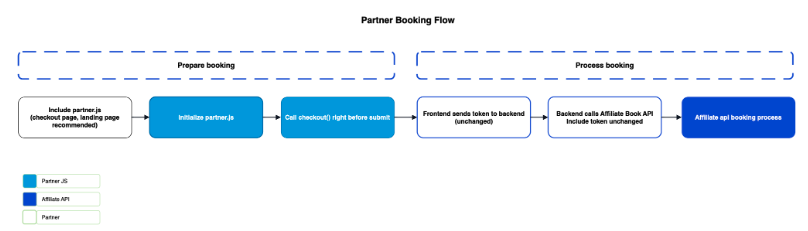
Integration flow
Follow the steps below to integrate partner.js into your website and enable token generation for fraud detection.
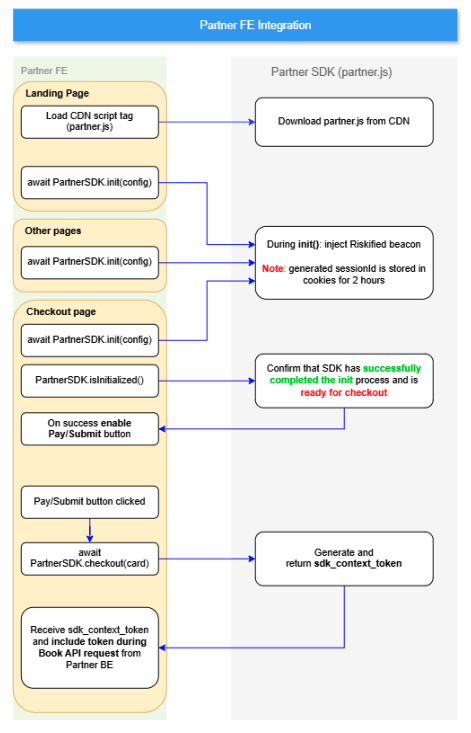
Step 1 - Installation & setup
Load partner.js on your home and checkout pages.
- Required: Home (where the user starts their booking journey) and checkout page (where the booking is submitted)
- Recommended: Search/details pages to establish the session earlier in the user journey.
- (Global - Preferred): Add the script to your base layout/template. This ensures the SDK and its security beacons are pre-loaded and ready immediately upon navigation to the payment page.
Example:
Place the following script in the <head> or before the closing <body> tag.
<script src="https://cdn6.agoda.net/s-cdn-partner-sdk/v1/`partner.js`"></script>The Partner SDK (partner.js) may dynamically load additional scripts and send browser beacons used for fraud detection and telemetry. To ensure full functionality (and avoid blocking required network calls), update your site’s Content Security Policy (CSP) to explicitly allow the SDK CDN, fraud vendor endpoints (Riskified), and the Bento analytics endpoints provided during onboarding.
Required CSP directives and example values
| Directive | Purpose / Description | Allowed Sources / Notes |
|---|---|---|
| script-src | Allow loading of partner.js and any secondary script loaders/beacons | - Agoda SDK CDN: https://cdn6.agoda.com - Riskified beacon/loader: https://beacon.riskified.com - Bento analytics scripts: https://bento.agoda.com - If you use nonces: Include 'nonce-YOUR_NONCE_VALUE' for each script tag that uses a nonce. |
| connect-src | Allow XHR/fetch/beacon network calls that the SDK will make | - Partner SDK to call Agoda BE: https://*.agoda.com - Riskified endpoints: https://*.riskified.com - Bento analytics collection endpoint(s): (https://bento.agoda.com/) (covered with https://*.agoda.com) |
| worker-src | Allow telemetry | - Agoda telemetry: https://www.agoda.com |
| img-src | Allow pixel image beacons (if used by fraud/analytics vendors) | - Riskified image pixel: https://img.riskified.com |
Example CSP header:
<meta http-equiv="Content-Security-Policy" content="
  script-src
    'self'
    https://www.agoda.com
    https://*.agoda.com
    https://*.riskified.com
    https://cdn6.agoda.net;

  connect-src
    'self'
    https://*.agoda.com
    https://bento.agoda.com
    https://*.agoda.local
    https://*.riskified.com

  worker-src
    'self'
    https://www.agoda.com
    https://*.agoda.com
    https://*.agoda.local;

   img-src
    'self'
    https://img.riskified.com;

">
Step 2 — Initialize a session in the browser
After the script loads, call the SDK initialization method to start (or resume) a session.
During initialization, the SDK collects eligible browser, session, and device context signals in a non-blocking manner. The SDK is designed to work with common partner security setups (including Content Security Policy (CSP) constraints).
- You can handle the init result using either Promise or a Callback.
Option A: Using the Promise response
Assign the response to a variable to access the token directly.
try {
 await window.partnerSDK.init({
   siteId: "12345",           // CID provided by Agoda
   environment: "production",    // or "sandbox"
   cspNonce: "rAnd0m12345",   // Optional nonce for CSP compliance
  });
 console.log("SDK is ready")  // Init success
} catch(e) {
   console.error("SDK init failed", error) // Init fail
}
Option B: Using a Callback
<script>
 window.partnerSDK.init({
   siteId: "12345",           // CID provided by Agoda
   environment: "production",    // or "sandbox"
   cspNonce: "rAnd0m12345",   // Optional nonce for CSP compliance
   onReady: () => console.log("SDK is ready"), // optional if used as promise
   onError: (error) => console.error("SDK init failed", error)
 });
</script>
Partner SDK init parameters
| Parameter | Type | Required | Description |
|---|---|---|---|
| siteId | string | Required | Unique identifier provided by Agoda to the partner |
| environment | Enum | Required | Environment to use ("sandbox" or "production") |
| cspNonce | string | Optional | Allows safe, authorized inline scripts/styles |
| onReady | function | Optional | Hook to enable UI elements once the SDK is "live" |
| onError | function | Optional | Hook to catch network or configuration errors |
Step 3 — Generate a context token (checkout)
Immediately before submitting the booking from your frontend, you must invoke the SDK checkout() method. This method collects required security signals and returns a booking context token, which must be forwarded to your backend.
- First, prepare your
cardDetailsobject:
// First, prepare your cardDetails object:
const cardDetails = {
  creditCardNumber: "4111...",   // Full card number
  cardHolderName: "John Doe",
  expiryDate: "122028",            // MMYYYYY format
  cvc: "123"
};- You can handle the checkout result using either Promise or a Callback.
Option A: Using the Promise response
Assign the response to a variable to access the token directly
const response = await window.partnerSDK.checkout(cardDetails);

if (response.success) {
  // Access the token and send it to your backend
  const token = response.sdk_context_token;
  await submitBookingToBackend(token);
}
Option B: Using a Callback
Pass a callback function as the second argument
const cb = (result) => {
  if (result.success) {
    console.log("Token received:", result.sdk_context_token);
    // Proceed with your backend submission logic
  } else {
    // Log the error code and message
    console.error(`Error [${response.error.code}]: ${response.error.message}`);
  }
};

window.partnerSDK.checkout(cardDetails, cb);
Important:The
sdk_context_tokenis an opaque string. Your backend must include it unchanged in the Affiliate Book API request to ensure the transaction is correctly validated and attributed
Configuration parameters
SDK checkout parameters
| Parameter | Type | Required | Description |
|---|---|---|---|
cardDetails | PaymentCardDetails | Required | An object containing the sensitive payment information (number, expiry, CVV) |
callback | CheckoutCallback | Optional | A function triggered upon completion, providing the CheckoutResult to the caller. |
PaymentCardDetails
| Parameter | Type | Required | Description |
|---|---|---|---|
creditCardNumber | string | Required | The credit card number will consist of 15 or 16 digits. Each digit can be 0-9 |
expiryDate | string | Required | Expiry Date in the format MMYYYY. Each digit can be 0-9 |
cvc | string | Required | CVC code consisting of 3-4 digits. Each digit can be 0-9 |
cardHolderName | string | Required | Cardholder name |
CheckoutResult
| Parameter | Type | Description |
|---|---|---|
success | boolean | Indicates if the verification was successful |
sdk_context_token | string | Conditional. Only present if success is true. This is the opaque verification token that must be passed to your backend. |
error | object | Conditional. Only present if success is false. Contains error details |
error.code | string | A machine-readable error identifier (e.g., FRAUD_FAIL, NETWORK_FAILURE). |
error.message | string | A human-readable description of the error for logging purposes. |
Step 4 — Pass the context token to backend
Send the token to your backend as part of your booking request payload.
- Treat the token as opaque: do not decode, parse, or modify.
- Do not persist to long-term storage (avoid localStorage/sessionStorage).
- Avoid logging the token. If logging is unavoidable, mask it.
Full flow example for sample checkout page (only for reference) :
<script src="https://cdn6.agoda.net/s-cdn-partner-sdk/v1/`partner.js`" nonce="rAnd0m12345"></script>

<script>
        const payBtn = document.getElementById('pay-button');

        // 1. GENERATE CONFIG & INIT()
        window.partnerSDK.init({
            siteId: "12345",
            environment: "sandbox",
            cspNonce: "rAnd0m12345", // Optional
            onReady: () => console.log("SDK Ready."),
            onError: (error) =>  console.log("Init Failed: " + error.message)
        });

        // Enable Book button regardless of init() result
        payBtn.disabled = false;
        // 2. CHECKOUT LIFECYCLE
        payBtn.addEventListener('click', async () => {
            payBtn.disabled = true;

            // Generate cardDetails object from UI
            const cardDetails = {
                creditCardNumber: document.getElementById('cardNumber').value,
                cardHolderName: document.getElementById('holderName').value,
                expiryDate: document.getElementById('expiry').value,
                cvc: document.getElementById('cvc').value
            };

            try {
                const response = await window.partnerSDK.checkout(cardDetails);

                if (response.success) {
                    const token = response.sdk_context_token;
                    console.log("Token generated! Sending to backend...");

                    // Send to your backend
                    await submitBookingToBackend(token);
                    console.log("Booking Successful!");
                } else {
                    console.error("Checkout failed. Please check details.");
                    payBtn.disabled = false;
                }
            } catch (error) {
                console.error("Error: " + error.message);
                payBtn.disabled = false;
            }
        });


        async function submitBookingToBackend(token) {
            console.log("Payload for backend:", { sdk_context_token: token });
            // Example: await fetch('/api/book', { method: 'POST', body: JSON.stringify({token}) });
            return new Promise(resolve => setTimeout(resolve, 1000));
        }
</script>
Step 5 — Send context token and customer IP Address to Affiliate Book API
- Pass
sdk_context_tokenreceived from SDK to affiliate BookAPI. - To ensure high booking success rates, pass the customer
ipAddress, customeremailaddress, and customerphonenumber to affiliate Book API.
{
  "waitTime": 120,
  "bookingDetails": {
    "userCountry": "US",
    "searchId": 1629183207719830000,
    "tag": "00000000-0000-0000-0000-000000000000",
    "allowDuplication": false,
    "checkIn": "2022-12-23",
    "checkOut": "2022-12-24",
    "property": {
      "propertyId": 12157,
      "rooms": [
        {
          "blockId": "blockid_v3",
          "offerToken": "offer_token",
          "rate": {
            "inclusive": 798.58
          },
          "surcharges": [
            {
              "id": 278,
              "rate": {
                "inclusive": 12
              }
            },
            {
              "id": 279,
              "rate": {
                "inclusive": 12
              }
            }
          ],
          "guestDetails": [
            {
              "title": "Mr.",
              "firstName": "JSONTest",
              "lastName": "JSONTest",
              "countryOfResidence": "US",
              "gender": "Male",
              "age": 30,
              "primary": true
            }
          ],
          "currency": "USD",
          "paymentModel": "Merchant",
          "count": 1,
          "adults": 2,
          "children": 2,
          "childrenAges": [
            5,
            6
          ],
          "specialRequest": "high floor"
        }
      ]
    }
  },
  "customerDetail": {
    "language": "en-us",
    "title": "Mr.",
    "firstName": "Test",
    "lastName": "Test",
    "email": "[[email protected]](mailto:[email protected])",
    "phone": {
      "countryCode": "66",
      "areaCode": "2",
      "number": "22222222222"
    },
    "newsletter": false,
    "ipAddress": "customer IP Address",
  },
  "paymentDetails": {
    "contextToken": "token",
    "creditCardInfo": {
      "number": 123456789000,
      "expiryDate": "032029",
      "cvc": 543,
      "holderName": "JSONTEST"
    }
  }
}
Schema fields
| Parameter | Type | Description |
|---|---|---|
paymentDetails.contextToken | string | The token generated from the SDK. |
customerDetail.ipAddress | string | The customer IP Address. |
customerDetail.email | string | Customer email address. |
customerDetail.phone | object | Customer phone number. |
- Refer to the Book API documentation to learn more about the Affiliate Book API.
Updated 4 months ago