
Room content
Overview
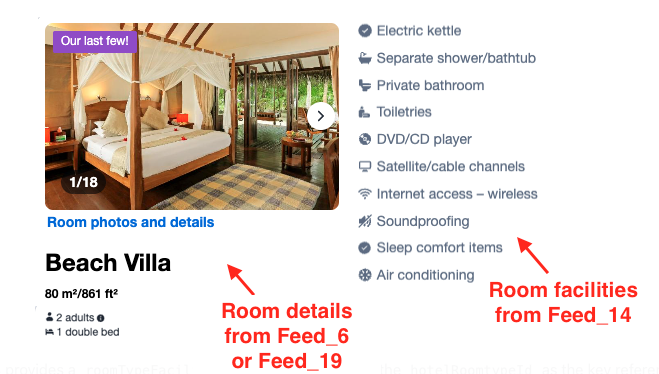
When building your implementation with our APIs, we recommend enriching the availability results with rich room content — photos, descriptions, bed types, occupancy capacity, and room facilities. This guide explains how to bridge the Content API with the Search API to obtain the above data.
What you are building
You are building:
- A static catalog of room content (photos, descriptions, bed types, occupancy capacity, facilities, etc.) from Content API.
- Dynamic availability flow using the Search API.
- A simple mapping between the two using a single room type ID.
Integration steps
Step 1: Build your room content catalog
- Initially, use the Feed_6 (or Feed_19) to pre-fetch room content, and build a static catalog.
- Feed_6 (or Feed_19) provides a
roomtypesarray, and you can index the content by the providedhotelRoomtypeId. - Only fetch parent rooms (Feed_6/Feed_19): Only the parent room types applicable for catalog and rate shopping. Refer to the Room type ID definitions section below to learn more.
- Feed_6 (or Feed_19) provides a
- Optionally, use the Feed_14 to fetch room type facilities for each property in your catalog.
- This feed provides a
roomTypeFacilityarray and you can index the content by matchinghotelRoomtypeIdfor your catalog.
- This feed provides a
- Refer to the Content API (Feed_6, Feed_14, Feed_19) documentation to learn more details about the room type data you can retrieve from these feeds.
Step 2: Get availability via the Search API
- Use the Search API to get availability for room rates.
- Map the
parentRoomIdvalue returned in the Search API response to thehotelRoomtypeIdin your catalog to fetch and display the associated room content. Refer to the Room type ID definitions section below to learn more. - You can send the optional
"content"keyword in theextraarray in the Search API to dynamically receive additional room content, such asparentRoomNamein the availability results.
Refresh content
- Properties may regularly add room types and/or update room content (new photos, updated occupancy capacity, or renamed room types). To ensure you have the latest data, we recommend that you refresh your catalog content as per our refresh schedule.
Room type ID definitions
You will find the following response fields referring to the same room type identifier across our API results.
| API | Field name | Description | Usage |
|---|---|---|---|
| Content API > Feed_6/Feed_19 | hotelRoomtypeId | The primary room type identifier in content feeds 6 and 19. | Primary key for your room catalog. Match the parentRoomId returned in the Search API to this ID. |
| Content API > Feed_6/Feed_19 | hotelMasterRoomtypeId | Parent/child flag and parent pointer. | Useful in catalog consolidation to extract parent rooms only (hotelMasterRoomtypeId=0 means the room is the parent room type). |
| Content API > Feed_14 | hotelRoomTypeId | The primary room type identifier in content feed 14. | Join the room facilities to your catalog using this ID. |
| Search API | parentRoomId | The parent (master) room type ID of the booked room for a given rate block. | Maps availability results to catalog content. Match this ID to the hotelRoomtypeId in the content catalog to get the representative room type content. |
| Search API | roomId | Alternative room identifier. | Ignore for content mapping and use parentRoomId instead. |
Content API- Feed_6 (or Feed_19): hotelRoomtypeId
hotelRoomtypeId- Location in response:
roomtypes.roomtypes[].hotelRoomTypeId - Content API - Feed_6 provides the Roomtypes per Hotel for a specified hotel ID.
- Content API Feed_6 Response excerpt: Note that in the following response example, a parent room and a child room exist for the same room type. In this case, you may only extract the parent room (
hotelRoomtypeId=3134583&hotelMasterRoomtypeId=0) and ignore the child room (hotelRoomtypeId=282342249&hotelMasterRoomtypeId=3134583) from your catalog.
{
  "roomtypeFeed": {
    "roomtypes": {
      "roomtypes": [
        {
          "hotelId": 12157,
          "hotelRoomtypeId": 282342249,
          "standardCaption": "Beach Villa",
          "standardCaptionTranslated": "Beach Villa",
          "maxOccupancyPerRoom": 2,
          "noOfRoom": 1,
          "sizeOfRoom": 213,
          "bedType": "",
          "hotelMasterRoomtypeId": 3134583,
          "hotelRoomtypePicture": "https://pix8.agoda.net/hotelImages/..."
        },
        {
          "hotelId": 12157,
          "hotelRoomtypeId": 3134583,
          "standardCaption": "Beach Villa",
          "standardCaptionTranslated": "Beach Villa",
          "maxOccupancyPerRoom": 2,
          "noOfRoom": 1,
          "sizeOfRoom": 213,
          "bedType": "",
          "hotelMasterRoomtypeId": 0,
          "hotelRoomtypePicture": "https://pix8.agoda.net/hotelImages/..."
        }
      ]
    }
  }
}
Content API- Feed_14: hotelRoomTypeId
hotelRoomTypeId- Location in response:
roomTypeFacilities.roomTypeFacility[].hotelRoomTypeId - Content API - Feed_14 provides the Room Type Facilities for all room types of a specified property ID.
- Content API Feed_14 Response excerpt:
{
  "roomTypeFacilityFeed": {
    "roomTypeFacilities": {
      "roomTypeFacility": [
        {
          "hotelId": 12157,
          "hotelRoomTypeId": 3134583,
          "propertyId": 25,
          "propertyName": "Air conditioning",
          "translatedName": "Air conditioning"
        }
      ]
    }
  }
}
Search API: parentRoomId
parentRoomId- Location in response:
properties[].rooms[].parentRoomId - A single Search API response can return multiple room rate results (referenced by
blockId) that represent different rate plans or configurations for the same underlying room type. All such blocks share the sameparentRoomId, which identifies the room type they belong to. - Search API response example (excerpt):
{
  "properties": [
    {
      "propertyId": 12157,
      "rooms": [
        {
          "roomId": 3134583,
          "blockId": "MDZlNDc0NTUtMTU2My05MmY3LWQwNjUtYzM3MWY3YjkyZDBjOjMzMg==",
          "roomName": "Beach Villa",
          "parentRoomName": "Beach Villa",
          "parentRoomId": 3134583,
          "ratePlanId": 617128
        },
        {
          "roomId": 3134582,
          "blockId": "JKLCgEtEMwCGigKHTIwMjYU2My05MmY3LWQwtMDktMDFUMDA6MDA6MAI=",
          "roomName": "Semi Detached Beach Villa",
          "parentRoomName": "Semi Detached Beach Villa",
          "parentRoomId": 3134582,
          "ratePlanId": 611876
        },
        {
          "roomId": 3134583,
          "blockId": "XYCSWv3c0NTUtMTU2My05MmY3LWQwNjUtYzM3MWY3YjkyZDBjOjMzMg==",
          "roomName": "Beach Villa",
          "parentRoomName": "Beach Villa",
          "parentRoomId": 3134583,
          "ratePlanId": 611876
        }
      ]
    }
  ]
}
Updated 3 months ago
Did this page help you?