
Content API 2.0
Overview
The Content 2.0 APIs provide a streamlined way to download the content for your booking implementation.
What's new
- Eligibility discovery — A dedicated Eligibility API returns the exact list of properties available for your account. Retrieving this list before requesting content ensures that you fetch and store only the properties you are able to sell, which reduces unnecessary calls and storage.
- Multi-property support — The Properties API allows you to retrieve content for multiple properties in a single request. Consolidating requests reduces network round trips and shortens the time required to load or refresh your catalog.
- Fewer endpoints — A single multi-property API and a single Reference Data API replace the multiple endpoints implementation required by the legacy approach. A smaller integration surface means less code to build, test, and maintain.
- Incremental change detection — The CDS API identifies precisely which properties have changed since your last synchronization. Updating only the changed properties keeps your content current while minimizing bandwidth, processing time, and API usage.
- Filtering by locale (planned for a later phase) — You will be able to request content in the language or languages you need, allowing you to retrieve the translations that you intend to display.
- Properties by city — Content for all properties in a given city can be retrieved through paginated requests. This provides a straightforward way to load an entire destination, which is well suited to launching new markets and powering city-level listings.
Fundamental Content APIs
| Building Block | Purpose |
|---|---|
| Eligibility API | Returns the full list of property IDs that are available for your account. This is the recommended starting point — call it first to know which properties to download. |
| Reference Data APIs | Retrieve the reference data entities — facilities, views, themes, property types, geographic hierarchy (continents, countries, states, cities, areas), hotel chains/brands, and images. |
| Properties API | Fetch comprehensive property content data: core hotel info, rooms, facilities, views, policies, images, highlights, and summarized review scores. You can fetch content by providing the list of eligible properties, or a city ID. |
| CDS API | Content Delta Service (CDS) returns the list of property IDs that have changed since a given timestamp, enabling efficient incremental refresh. |
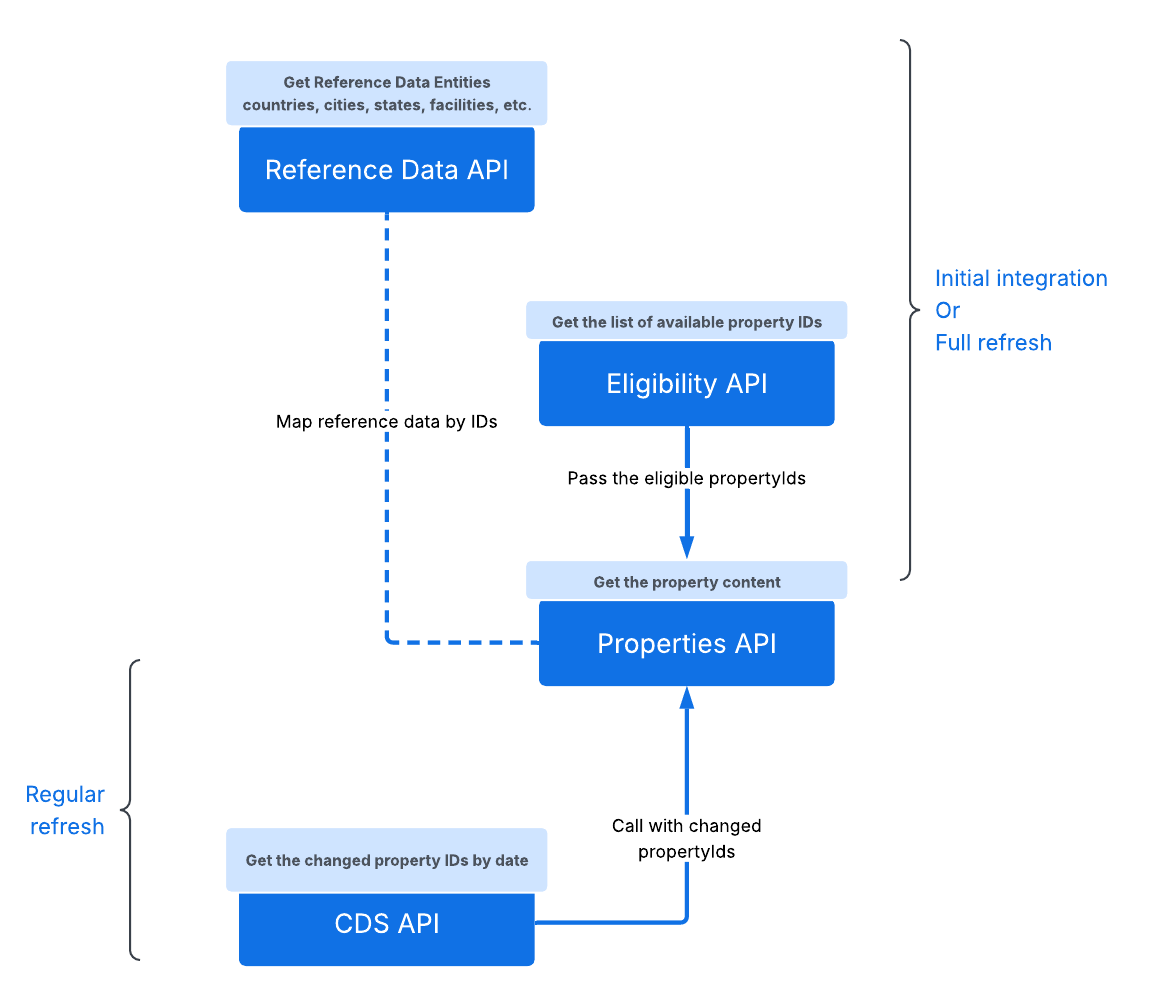
Integration steps
- Reference data: Call the Reference Data API and download all of the reference data.
- List of eligible property IDs: Use the Eligibility API to discover the eligible property catalog for your account.
- Content of properties: Call the Properties API to fetch the properties content. The mapped reference data IDs (e.g., facilities, themes, amenities, etc.) can be resolved using the respective Reference Data API content.
- Refresh: Schedule CDS API calls to refresh and keep the content up-to-date.
Properties API handles batching efficiently.
Total Time taken for full properties refresh ~ 2 hours (Considering 5 RPS).
Download/ refresh frequency
The content download can fall into one of the following three scenarios.
| Scenario | When | Approach |
|---|---|---|
| First-time integration | Initial onboarding — you have no Agoda content yet | Full download of reference data + all properties based on eligibility (follow the integration steps 1-3 above) |
| Regular refresh | Daily operations — keep content fresh | Incremental updates using CDS (changed properties only) |
| Full refresh | Monthly - Periodic reset or after major changes | Repeat full download of all content for a scope (country, city, or global) |
First Load: Reference Data API → Eligibility API → Properties API (batch by IDs)
Refresh: CDS API → Properties API (changed IDs only)
Regular refresh
- Refer to the CDS API to learn how you can perform regular refresh using the CDS API.
Full refresh
A full refresh re-ingests all property content for a defined scope, replacing your stored data with the latest version.
| Scenario | Why |
|---|---|
| CDS sync gap too large (over 7 days) | A Full refresh will be faster than catching up incrementally. If you haven't synced for over 7 days, this is the only option |
| Suspected data drift | Your stored content diverges from our source of truth |
| Your scope has changed significantly | Additional supply or new availability unlocked |
| If we announced major data model changes | New fields or restructured responses require re-processing |
Full Refresh Strategy
- The full refresh steps are the same as performing a first-time download.
- An important additional step is to pause the CDS regular refresh job before starting a full refresh. This avoids conflicts between incremental refresh updates and the full reload running at the same time.
- Once you complete the full refresh (trigger the same first-time integration steps 1-3 above), make sure to preserve the last sync date/time and restart the regular refresh schedule via the CDS API.
Updated 11 days ago
Did this page help you?