
Partner-Funded Subsidy
Implementing Partner-Funded Subsidies
Overview
This is only applicable to partners where BHI is the Merchant of Record (MoR).
The partner-funded subsidy feature allows you to fund and apply discounts at the time of booking. This means you can apply a subsidy amount at checkout to reduce the price the customer pays.
How it helps
- Improving price competitiveness: Allows you to offer lower effective prices to applicable customers.
- Driving incremental demand: More attractive pricing increases conversion and bookings.
- Partner-controlled funding strategies - Since the subsidy is applied at checkout to the total the customer pays, you can independently control the subsidy strategies.
Enable partner-funded subsidy
This feature is not available to all integrations by default, and requires feature activation. Contact your Account Manager to confirm eligibility and activate before implementing.
How it works
When a subsidy is applied:
- The customer pays less because the subsidy is deducted from the total the customer is charged at checkout.
- The base rate is unchanged, therefore any pricing logic and tax calculations are unaffected.
Example:
| Amount | |
|---|---|
| Base rate (per night) | $40.00 |
| Booking total (2 nights with taxes and fees) | $100.00 |
| Partner-funded subsidy (example: seasonal coupon for 10% off the total as partner subsidy) | $10.00 |
| Customer pays | $90.00 |
- The
estimatedCommissionfield will reflect your earned commission pre-subsidy.
| Amount | |
|---|---|
| Booking total (2 nights with taxes and fees) | $100.00 |
Estimated commission (15% on total) > estimatedCommission field | $15.00 |
| Partner-funded subsidy | $10.00 |
| Net commission for the booking | $5.00 |
-
The subsidy is recorded separately and reconciled offline. The customer payment and the partner-funded subsidy amount will be recorded distinctly in the booking system. The finance team extracts the subsidy data from booking systems and reconciles with you directly.
-
Note that in the current phase, the partner-funded subsidy feature is not supported for date change amendments.
Pass the partner-funded subsidy in Precheck and Book
- When a partner-funded subsidy applies, pass the following request field in your Precheck and Book API requests to indicate the subsidy amount.
| Field | Type | Description |
|---|---|---|
rooms.subsidy.amount | number | Fixed dollar amount to subsidize. Must be greater than 0 and less than the total booking amount . Optional field. Only passed when a subsidy is applied. |
- Refer to the Book API documentation to learn more about the request fields.
- When provided, the customer's charge amount will be adjusted for the booking (deducting the subsidy amount from the booking total).
- You need to consider the following implementation rules when passing the
subsidy.amountvalue.- Must be a dollar amount. Percentage-based inputs are not supported.
- Must be greater than 0 and less than the total booking amount. A subsidy amount equal to or exceeding the booking amount is not permitted.
Example
- The following example of UI shows a scenario where a 15% partner subsidy is applied to a booking total.
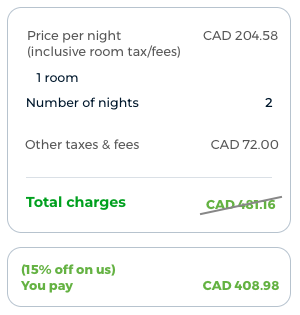
- In this example, you will calculate the dollar amount for the percentage-based subsidy. Therefore,
subsidy.amount=72.18is passed. - Precheck API request (excerpt):
{
  "precheckDetails": {
    "checkIn": "2026-09-01",
    "checkOut": "2026-09-03",
    "property": {
      "propertyId": {{property_id}},
      "rooms": [
        {
          "currency": "USD",
          "blockId": "v1_CgEtEMwCGigKHTIwMjYtMDktMDFUMDA6MD...",
          "rate": {
            "inclusive": 204.58
          },
          "subsidy": {
            "amount": 72.18
          },
          "surcharges": [
            {
              "id": 460,
              "rate": {
                "inclusive": 72.00
              }
            }
          ]
        }
      ]
    }
  }
}- Book API request (excerpt):
{
  "bookingDetails": {
    "searchId": 8536457787657228384,
    "checkIn": "2026-09-01",
    "checkOut": "2026-09-03",
    "property": {
      "propertyId": {{property_id}},
      "rooms": [
        {
          "blockId": "v1_CgEtEMwCGigKHTIwMjYtMDktMDFUMDA6MD...",
          "rate": {
            "inclusive": 204.58
          },
          "subsidy": {
            "amount": 72.18
          },
          "surcharges": [
            {
              "id": 460,
              "rate": {
                "inclusive": 72.00
              }
            }
          ]
        }
      ]
    }
  },
  "customerDetail": {
    "firstName": "John",
    "lastName": "Doe",
    "email": "[email protected]",
    "phone": {
      "countryCode": "66",
      "areaCode": "2",
      "number": "22222222222"
    }
  },
  "paymentDetails": {}
}
Cancellation of bookings with subsidy
- You need to factor in the subsidy amount when handling cancellations and implement accordingly as explained below.
- If a cancellation is fully refundable,
- Refund to the customer = refund amount - subsidy amount
- Customer is refunded the total amount they paid.
- If a cancellation incurs a penalty,
- The full penalty amount pre-subsidy is applied. A penalty is not prorated to the post-subsidy total paid by the customer.
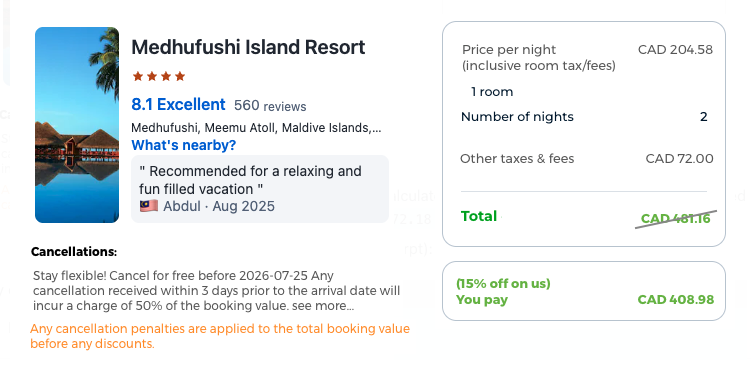
- You need to calculate the customer refund amount in your implementation. And with your cancellation policy text, you may need to display a disclaimer with appropriate verbiage, explaining that the subsidy amount is deducted from the refund.
Sample UI at checkout:
- Examples:
| Example of cancellation policy | Amount | |
|---|---|---|
| Cancellation received within 7 days before check-in date > 1-night room charge as cancellation penalty | Base rate (per night) | $40.00 |
| Booking total (2 nights with taxes and fees) | $100.00 | |
| Subsidy | $10.00 | |
| Customer paid | $90.00 | |
| Penalty (1-night charge) | $50.00 | |
| Customer refund | $40.00 |
*Note that if you do not recalculate the customer refund, you might misrepresent the refund amount they get as $50.
Error Scenarios
| Scenario | Result |
|---|---|
subsidy.amount ≥ booking total (or negative value) | Booking failure with error: 907: Invalid partner subsidy provided, subsidy must be non-negative and less than or equal to total price |
[partnerFundedSubsidy](subsidy.amount) < 0 | Booking failure with an error: 906: Invalid request format: $.bookingDetails.property.rooms[0].subsidy.amount: must have a minimum value of 0 |
| Feature not enabled for your account | Error message: 907: Invalid data: Partner subsidy is not allowed for this siteContact your Account Manager if you want to enable this feature. |
Updated 2 months ago